密码及微信关联失效解决方法 Solutions for Password and WeChat Association Failures
客户端登录失败解决方法 How to Fix Client Login Issues
目前升级邮箱暂不支持手机浏览器方式登录,手机端请通过客户端方式进行登录,或通过电脑端进行登录。
At present, the updated email system does not support login via mobile browsers. For mobile access, please use the dedicated client application or log in through the desktop version.
1、 密码及微信关联失效解决方法
Solutions for Password and WeChat Association Failures
1)手机号登录 (Mobile Login)
a.由于升级,密码及微信关联失效请选择“手机号登录”,后续可根据偏好配置其他方式。
Due to upgrade, if your password or WeChat association fails, please select "Phone Number Login." You may configure other preferred methods later.
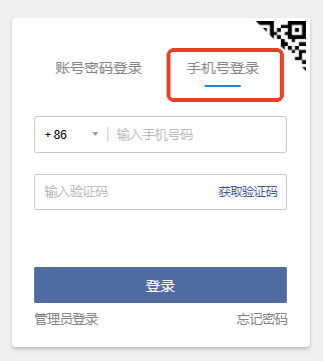
b.如果手机号绑定出错,若未绑定微信,请联系管理员绑定手机号处理85070066。若用户已绑定微信,则需按如下方式,自行在web端进行配置。
If a mobile number binding error occurs and the user has not bound a WeChat account, please contact the administrator to handle the mobile number binding (Tel: 85070066). If the user has already bound a WeChat account, they need to configure it themselves via the web client as follows.
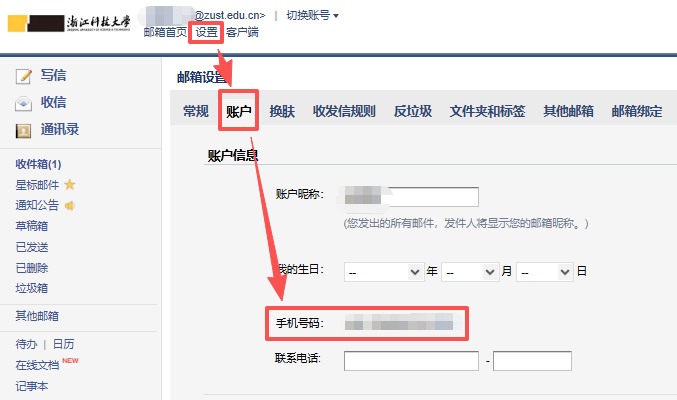
2)账号密码登录 (Account Password Login)
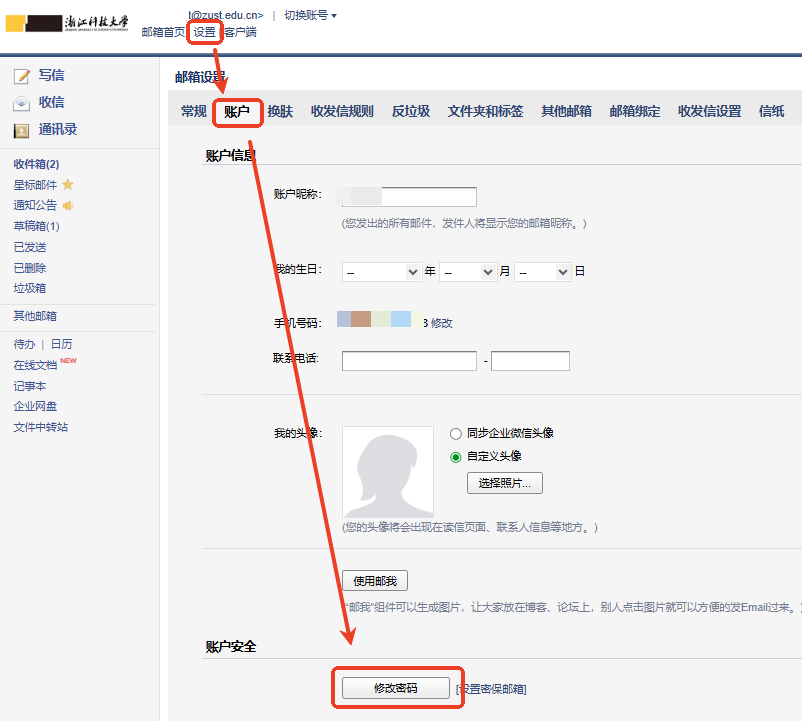
a.通过手机号登录后,点击左上角"设置",如下操作所示进行密码设置。
After logging in with your mobile number, click "Settings" in the upper left corner to set up password as follows.
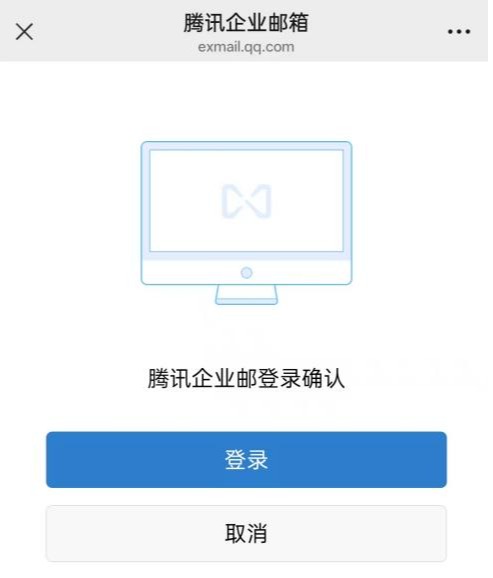
b.通过微信扫码完成身份验证,验证通过后选择继续设置密码。
Complete identity verification by scanning the WeChat QR code. After successful verification, choose to continue setting the password.
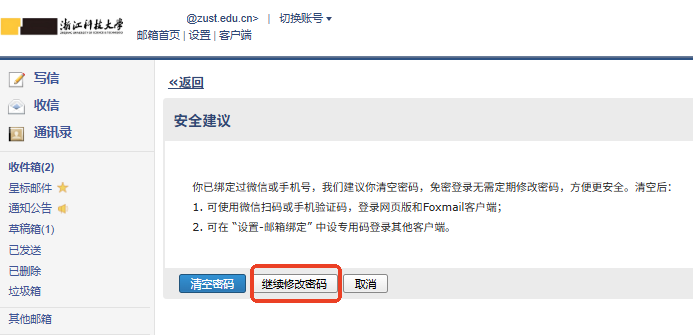
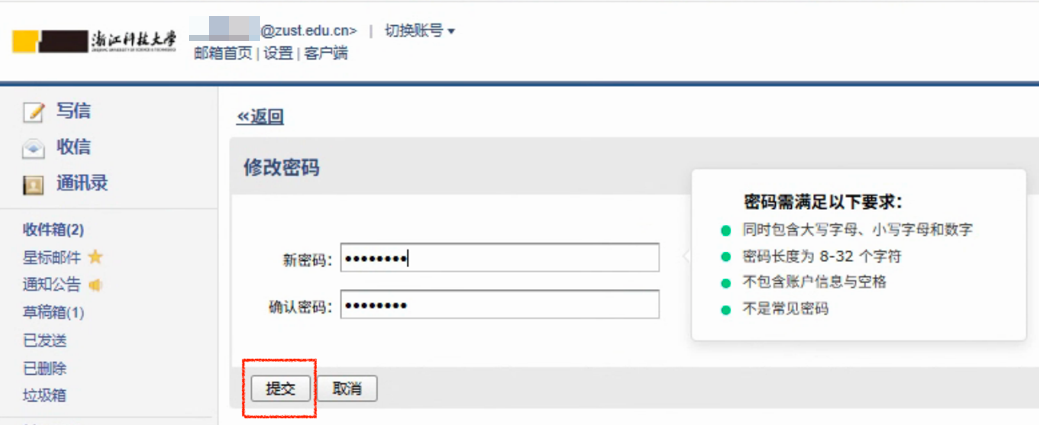
c.设置成功后系统显示成功提示,使用账号密码登录验证是否设置成功。
The system displays a success message after setup is completed. Verify the setup by logging in with account and password.
d.注意事项:密码设置是非必须的,用户可根据需要选择是否设置密码登录。建议设置密码作为备用登录方式。
Important Notes: Password setup is optional, users can choose whether to set up password login based on their needs. It is recommended to set a password as a backup login method.
3)微信扫码登录 (WeChat Scan Login)
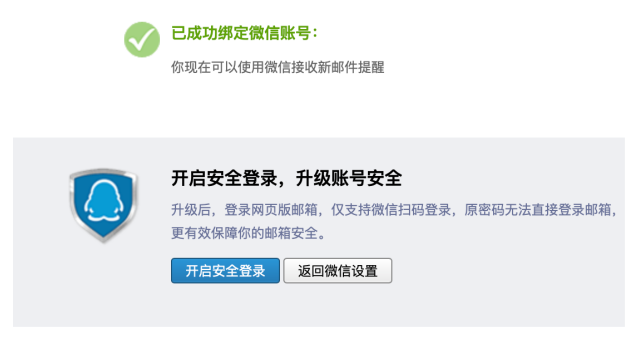
a.通过手机号成功登录邮箱系统,进入主界面,并点击左上角"微信绑定"选项。
Successfully log into the email system and access the main interface. Click on the "WeChat Binding" option in the upper left corner.

b.使用微信扫描显示的二维码完成账号关联。
Use WeChat to scan the displayed QR code to complete account linkage.
2、 手机号绑定失败解决方法
How to Fix Phone Number Binding Issues
a.若未绑定微信,请联系管理员绑定手机号85070066。若已绑定微信,则需按如下方式,自行在web端进行配置。
Have you bound WeChat to your account?
No: Please contact the administrator at 85070066 to bind your phone number first.
Yes: Please configure it yourself on the web client using the following instructions.
3、 客户端登录失败解决方法
How to Fix Client Login Issues
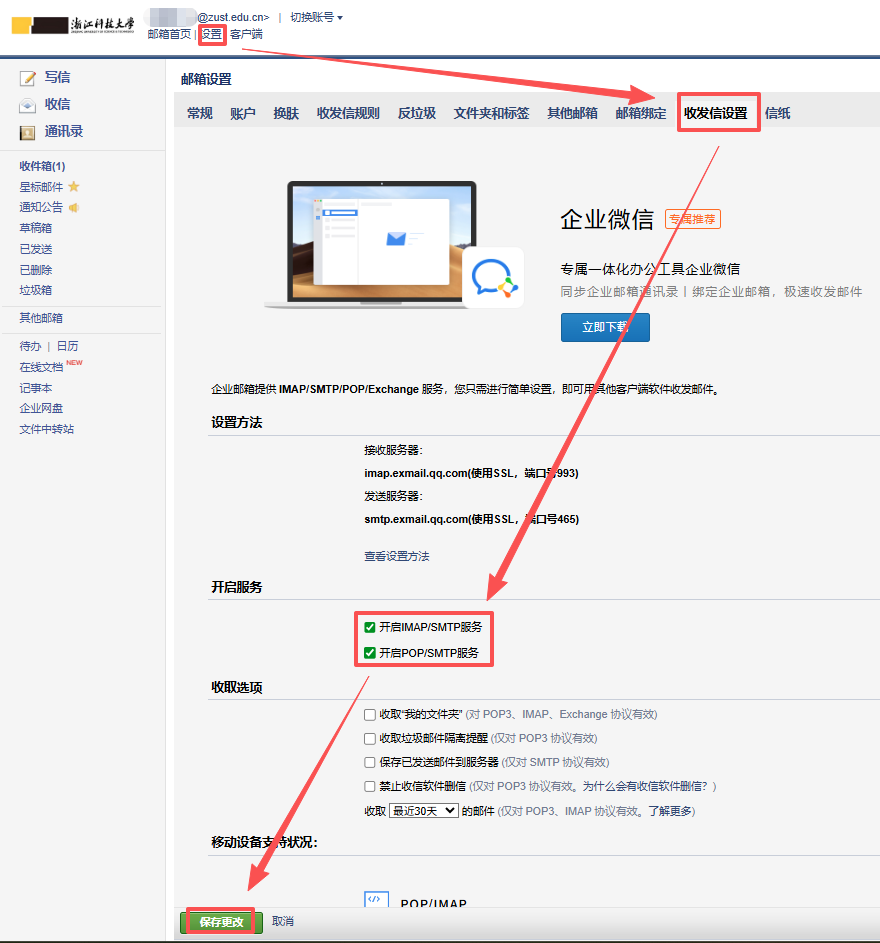
a.若客户端登录失败,请先检查web端,进行如下设置:
If the client login fails, please first check and configure the following settings on the web portal.
b.若仍然失败,可能是已经开启了安全登录,则按如下路径,获取客户端密码:
If the issue persists, it may be because Safe Login Mode is enabled. In this case, follow the path below to obtain your client password:
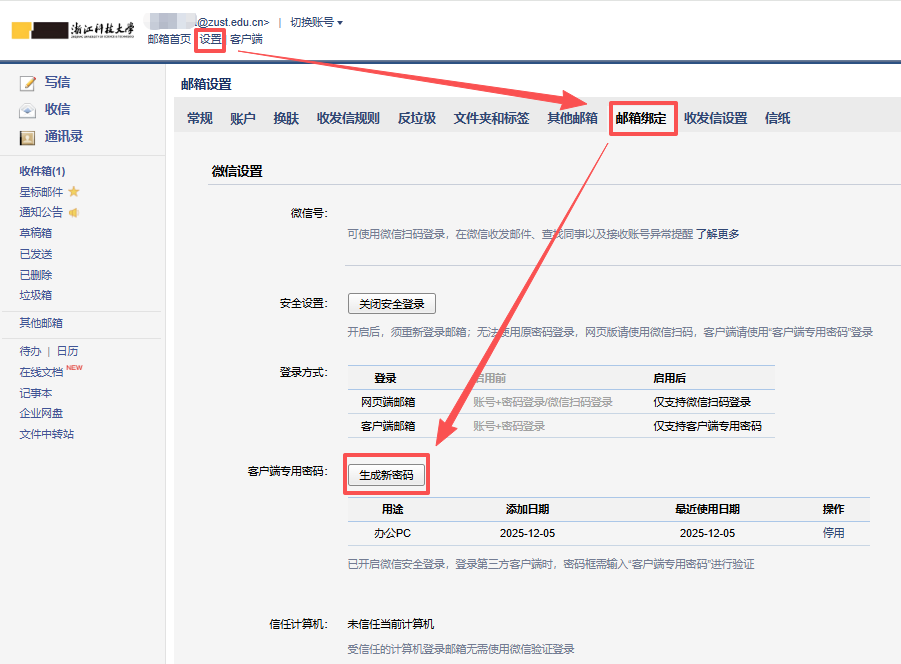
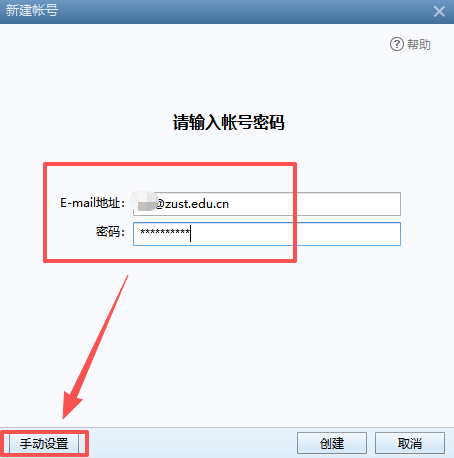
c.这里以Foxmail为例说明配置过程。如若在客户端新创建账号,在指定位置输入邮箱地址及密码后,点击“手动设置”按钮,如图所示:
Using Foxmail as an example: When setting up a new account in the client, input your email address and password, then click "Manual Setup" as shown:
d.按如下协议进行设置:
Configure using the following protocols:
IMAP协议
接收邮件服务器:xcimap.exmail.qq.com,使用SSL,端口号993
发送邮件服务器:xcsmtp.exmail.qq.com,使用SSL,端口号465
POP3/SMTP协议
接收邮件服务器:xcpop.exmail.qq.com,使用SSL,端口号995
发送邮件服务器:xcsmtp.exmail.qq.com,使用SSL,端口号465
IMAP Protocol
Incoming Mail Server: xcimap.exmail.qq.com (Use SSL, Port: 993)
Outgoing Mail Server (SMTP): xcsmtp.exmail.qq.com (Use SSL, Port: 465)
POP3/SMTP Protocol
Incoming Mail Server (POP3): xcpop.exmail.qq.com (Use SSL, Port: 995)
Outgoing Mail Server (SMTP): xcsmtp.exmail.qq.com (Use SSL, Port: 465)



 校园网常见问题